
In this tutorial you will learn how to link to a specific Elementor accordion, tab or toggle, directly from the URL.
I have now updated this tutorial so that it works for same page links: click a link or a button that links directly to an Elementor accordion, tabs or toggle, and it will:
- Automatically open the related tab or accordion (and keep it open if it already was)
- Scroll to the proper tab or accordion
- For the accordions and toggles, it will wait 0.4s before scrolling, so that the layout shift from the opening and closing is done, and the scrollTo position is accurate
Works whether coming from another page, or clicking an anchor on the same page!
Ready? Let's learn how to open specific Elementor tabs, accordions or toggles based on the link that was clicked!
Test the demo on this page by adding #heythere and #bonjour at the end of the URL!
Watch the excellent video by Imran:
If you would like even more features, check the Elementor Horizontal Scroll Menu, Taxonomy, Tabs With Images Premium tutorial. This is what that premium tutorial shows you:
Features from that premium tutorial:
- Great UX: Automatically scrolls to the center of the clicked item
- PageLoad Smart: Automatically scrolls to the center of the current menu item (if one of them is the current page), current taxonomy filter, or current tab
- Open Tab: Scroll to and open the proper tab on page load through an ID in the URL (site.com/#example-id)
- Auto Scroll Back Up: On Tab Switch, automatically scroll back up to the top of the tabs element. Useful if your tabs titles are sticky
Back to the current tutorial:
To start with, add an HTML element and copy paste the code in
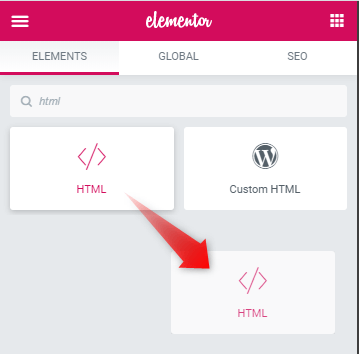
Insert the HTML element anywhere in the page, preferably close to the tab, accordion or toggle element.
<script>
/* Please login to get the code
 * The code will be for the Elementor Open Specific Tab, Toggle or Accordion on Link Click tutorial
 * Found at this URL https://element.how/elementor-open-specific-tab-toggle-accordion/
 */
</script>
Then, add IDs within your tabs or accordion titles
For the new Elementor Tabs and Accordion elements
If you are using the new Elementor Tabs and Accordion elements, you will see an ID field close to the title field:
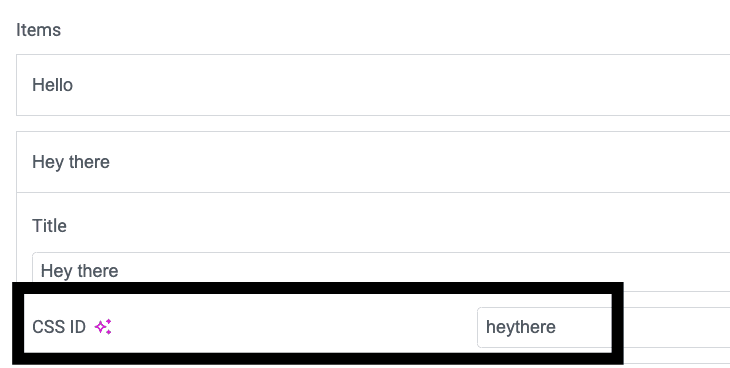
Simply enter your IDs there. I recommend you keep it lower case.
For the old Elementor accordion or toggle titles
If you are using the old Elementor accordion or toggle titles, you will want to copy paste this:
<script>
/* Please login to get the code
 * The code will be for the Elementor Open Specific Tab, Toggle or Accordion on Link Click tutorial
 * Found at this URL https://element.how/elementor-open-specific-tab-toggle-accordion/
 */
</script>
Copy within the title directly, and change hello to the ID of your choice. This will be the #anchor.
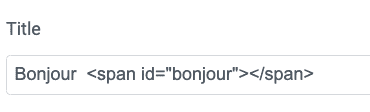
All IDs need to be unique.
For the old Elementor tabs
Avoid using the old Elementor tabs, it won't work properly as Elementor is automatically duplicating the title in the DOM, resulting in duplicate IDs, and scrolling to the top of the page on mobile.
Now, add link to your tabs or accordion titles
Now all that's left to do is to add links wherever you want, as you normally would for any anchor.
yourwebsite.com/#your-tab-id-here
Adjusting the code
The code really takes care of pretty much everything automatically here.
The only part you might want to change is this line:
let scrollOffset = 200; /* scroll offset from the top of title */
Adjust the 200 as you wish.
Finally, enjoy your new Elementor specific tab, accordion and toggle opener!
That's right! It's that simple with the new version.
Important: the code for this tutorial was completely rewritten end of November 2023, so the earlier comments below might not be too relevant anymore.
Let me know if everything works for you!
318 Responses
Hi, I have a tab in a template that I use on various subpages, and I’d like to display a different tab first on each of these pages. For example, https://www.petterkarlsson.com/husky-expedition/ – here, the ‘expedition’ tab should be visible first. Can I use the code for this, and if so, where do I insert it?
Many thanks in advance!
Greetings!
Sorry it won't work for what you need here. I could code what you need as custom work if you are interested (email me if so, see footer for my email).
Alternatively, switch your design to pseudo tabs, then each page will be its own tabs. This would also benefit SEO. Learn more about pseudo tabs here: https://element.how/elementor-pseudo-tabs-for-performance-and-bug-prevention/
Cheers!