
Elementor Pro Gallery - Add Different Links to Each Image
No extra plug-ins required! Elementor Pro Required.
Updated 26 June 2023
Here is how to easily add a different link to every image in the new Elementor Pro gallery element! These Elementor gallery links are not yet available directly from that element’s settings.
Probably Elementor will add this functionality soon, but meanwhile here is a way to make this work.
Working examples:
Also works with multiple galleries:
To begin with, set your Elementor Pro gallery "link" setting to "custom"
Important: videos watchers, these instructions aren’t in Imran’s video!
This will create the proper HTML markup that we need for the code to work. It will wrap each image in a <a> element.
Find the Link setting, and set it to Custom URL. Then in the URL bar, enter “#”.
![[Pro] Elementor Gallery Links - Unique Link for Each Image 1](https://element.how/wp-content/uploads/2023/06/make_clickable_gallery_pro_set_link.png)
Now, add an HTML element on the page with that Elementor Pro Gallery
It doesn’t really matter where on the page the Element is added…
![[Pro] Elementor Gallery Links - Unique Link for Each Image 2](https://element.how/wp-content/uploads/2019/08/htmelement.png)
Then, add this code the html element, and edit the links to your own
The first link will be automatically linked with the first image in the gallery, and so on. Add a link for every image.
<script>
/* Please login to get the code
 * The code will be for the [Pro] Elementor Gallery Links - Unique Link for Each Image tutorial
 * Found at this URL https://element.how/elementor-gallery-links-pro/
 */
</script>
Opening links in a new window (or new tab) [optional]
To open the links in a new tab instead of opening in the same window, add this code
<script>
/* Please login to get the code
 * The code will be for the [Pro] Elementor Gallery Links - Unique Link for Each Image tutorial
 * Found at this URL https://element.how/elementor-gallery-links-pro/
 */
</script>
directly below this line of code
linkedImage.href = links[i];
Want to skip an image?
If you want to skip an image, ie don’t have a link for it, simply enter no URL for it’s place in the list.
So let’s say you have 3 images, and you want to skip image 2. Your links variable becomes:
let links = [
        'https://element.how/elementor-pop-ups-problems/',
        '',
        'https://element.how/amazing-accordion-section/',
];
Extra: Want these Elementor Gallery Images to open a Popup ? Use this code instead.
You will need to add the class name popupGallery to your Gallery Pro element, under Advanced > CSS classes.
![[Pro] Elementor Gallery Links - Unique Link for Each Image 3](https://element.how/wp-content/uploads/2023/10/popupGallery-class-name.png)
Check this image to find your popup IDs.
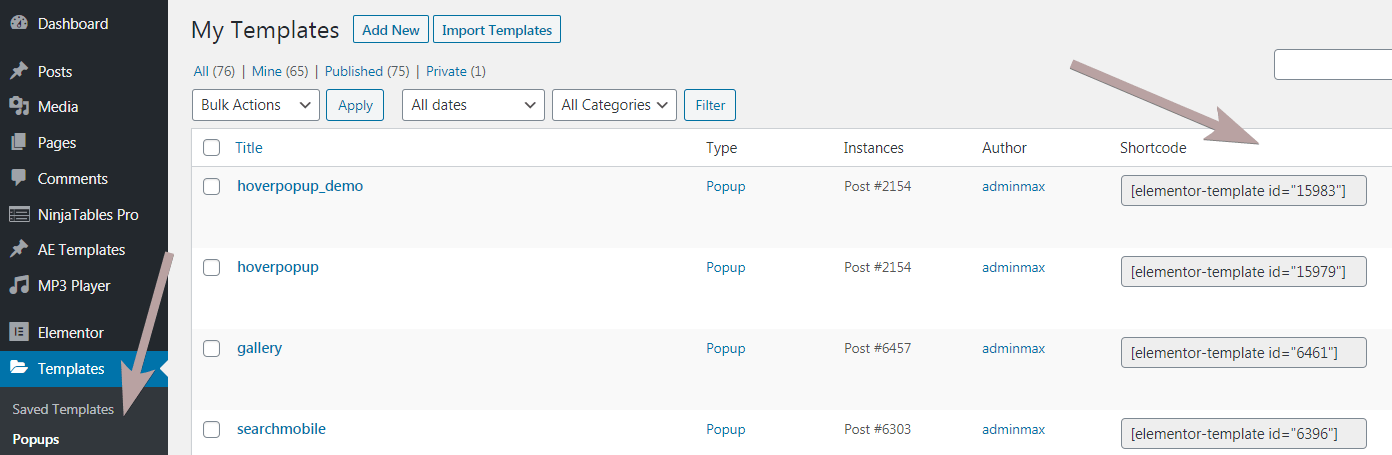
Add this code in your HTML element:
<script>
/* Please login to get the code
 * The code will be for the [Pro] Elementor Gallery Links - Unique Link for Each Image tutorial
 * Found at this URL https://element.how/elementor-gallery-links-pro/
 */
</script>
I followed the instructions but to no sucess... This is the page: https://www.rodrigoarruda.com/index.php/works-4/
Hey Rodrigo!
The code is for the gallery PRO element, you are using the gallery FREE basic element.
Nice bit of code, works well.
Is there an updated code when using the elementor pro multiple galleries instead of single?
Hey James!
No... the exact same code works for both single and multiple galleries!
Hi Maxime,
a strange thing happened, i see all images on my gallery and the hover-over shows that they can be clicked - but there is no redirect happening...
https://acework.io/resources/
any idea what could cause this?
Many thanks!
Hey !
You are missing single quotes in your array of links! Here is what you have:
Here is what it should be :
Hi !
Sorry for my aproximate English.
I used this code on one of my galleries, everything works fine. But I just realized that the code is applied to my other galleries. Do you have any idea how to fix this?
On the first gallery I did link on any to make it work. The second one I put media link.
Thanks.
Hi there! Is there a simple way of having links open either on the same window or in a new tab case-by-case? For example, I use "WP External Links" which opens external links into new tabs, but internal links in the same window. However, although the option "overwrite existing rules" is set, it doesn't work with this code: it opens one way or another only.
Thank you so much for this wonderful solution.
I have a test page with the setting to open in a new window.
A new window does open as expected, but the source page gets some code appended resulting in a reload to a 404.
Could you please have a look?
Test page is https://kempresources.com/test-websites-by-kemp-resources/
You will see the appended code is [object%20Window]
Thanks again for sharing your expertise.
Hey Mike!
This line you have here isn't quite right:
location = window.open(links[i]);
Change to just
window.open(links[i]);
Cheers!
Oh, of course! Perfect, fixed, thank you very much.
Welcome!
Thank you for the code, looks fine, but it works not really for all pics.
See at the site
https://web.barbarahoeller.at/salon2/bip/
on some pics the cursor doesn't change to a hand symbol and only on one pic (called 'Tagesstruktur') the link works really.
what wrong?
best
bahoe
Oh, I notice that I have two galleries on this page. Does this code work for both at the same time? in what order do I have to put the links? line 1 left to right, then line two left to right?
best
b
Hey Bahoe!
Change this line:
for (var i = 0; i < filteredImages.length; i++) { With for (var i = 0; i < links.length; i++) {
I think I got it. first the left gallery is addressed (1st line, then 2nd line) and then the right gallery (also 1st line, 2nd line).
It works now.
Many Thanks
it's good to talk to someone, then sometimes you come up with a solution
best
b
Hi Maxime, just wanted to say thank you! This has been a life saver in designing our website, we would have been completely stuck without the article and your helpful follow ups on this thread! THANK YOU! 🙂
Welcome Neil!
for me a strange situation, wuth your code (with your site on link) works fine, with my link in code not work.
with my links the pointer link not recognize.
https://imagenvironment.com/t-shirt-creative-e-idee-fashion/
thanks
ok resolve, the "," was the problem
Hi Maxime!
Will it make any difference if i use the free feature, which is the basic gallery?
I follow the instructions that you mentioned, unfortunately it's not working.
Here's my link. And I'm referring to the Gallery at the bottom
Thank you in advance!
http://www.syasyahiera.com/quick-hi
Hey Syasyahiera!
The code is for the gallery PRO element, you are using the gallery FREE basic element.
Excellent code! Works perfectly! Good job
Thank you for showing your appreciation Joseba! Really glad you enjoy!
Hi Maxime!
Unfortunately the popup code doesn't work for me and I don't know why.
This is on my site : http://www.agencedesmagiciens/photos
This is the code I used :
.e-gallery-item{cursor: pointer;}
document.addEventListener('DOMContentLoaded', function () {
let filteredImages = document.querySelectorAll('.e-gallery-item');
let popupposts = ['15979','417','467','843','1400']; /* [elementor-template id="13238"] */
filteredImages.forEach(function(e,i){
e.addEventListener( 'click', function(){
elementorProFrontend.modules.popup.showPopup( { id: popupposts[i] } );
} );
});
});
Can you help me ?
Thanks
I found the solution thanks!
Hi,
Firslty thanks i have been looking for this for a long time.
However i cant get it to work, i do exacly as it says, the "link" setting is at none, i copied exacly what you posted, and made sure the number of images matched the amount of links. Still no reaction from it at all, it does nothing.
Can you help?
Hey Seb,
Could you share the URL where you are testing this?
Sadly I am on the same spot as Seb,
Thank you so much for your help Max, i can't get it to work either on my end and I made sure to have the correct links and to have the link setting is also in none. Please help!! thank you!!!
Hey Bella!
Could you share the URL where you are testing this?
Hey guys, here an alternative way to do it and get the same results.
https://ibb.co/jJ9nhp3 (First one is with an image gallery)
https://ibb.co/gTG5pXZ (Second one first step is to select the appropriate structure to get something similar to the gallery which you'll see highlighted. After that just add the image box and the rest is the same, but the difference is that now you can add a custom url.)
Hope I helped
Sorry Hussam but I don't really know what you are sharing here. Your first screenshots shows nothing at all of value or that could be any kind of instructions. It's a random screenshot of a few images.
Your other screenshot, you seem to be saying that if you use individual images instead of the gallery element, you can add links to each image. All well and good, however then you don't have the filtering, the shared lightbox, the layout...
Hey Maxime, I guess I didn’t really put effort into explaining it throughly. I’ll create a short guide as soon as I’m able. Also, this is just intended for those that want the image gallery effect as in my case I wasn’t interest in anything else. So it’s not a complete fix, but it’s better than nothing and maybe there are a few people out there which will satisfy their needs as it didn’t for me.
Hi!
Thank you very much for the code, it worked perfect. For those of you struggling with carrousels and popups, this updated code was the one that did the trick, changing the element from .e-gallery-item to .swiper-slide:
.swiper-slide{cursor: pointer;}
document.addEventListener('DOMContentLoaded', function () {
let filteredImages = document.querySelectorAll('.swiper-slide');
let popupposts = ['2934','2950','2960','2936','2951','2962','2937','2952','2963','2939','2953']; /* enter your popups IDs here , in the order you want them to show up */
filteredImages.forEach(function(e,i){
e.addEventListener( 'click', function(){
elementorProFrontend.modules.popup.showPopup( { id: popupposts[i] } );
} );
});
});
Thanks! It worked! However when I set the Gallery titles for 3 galleries - All/ Videos/Photos - which served as tabs, how do I adjust the font size of the title(especially when it is for mobile)?
I couldnt put html classes in the titles fields to adjust the CSS, because then the provided code in the HTML widget would then not work.
Under Content, only the captions' typography size could be adjusted and not the titles.
Hope you could help me here!
Hey!
Are you commenting on the right post? This tutorial is about making a link for each image in the Gallery Pro... your comment seems to be about something else...
Hey! Yes - I'm commenting on this post. I managed to create the multiple galleries with photos that are individually linked to different sites with your code.
What I want to know is - in your example, above your multiple photo gallery there are three titles "All Features Images". How can I adjust the font size for the gallery titles? I'll like to adjust it for mobile size. Thanks!
I believe you can adjust the styles for these from within the Elementor UI
Hi
Do you use some CSS to do the nice hover image?
thanks
Greetings Pascal!
Sorry I don't know what hover image you are referring to?
Hello,
I have 2 galleries on my page. There are identical but differently layed out. The 1st one appear at the top of my header the second appeared when we scroll down and have a sticky header. The links don't work for my second gallery. Sorry but I'm not acquainted with JS but is it possible to add a condition like for each in your code ?
Thanks and best regards.
Greetings Muriel,
My code should already work for multiple Gallery Pro element on the same page... However if you have a gallery inside of a sticky section (or container), that might interfere and cause problem, because Elementor duplicates the markup for sticky sections and containers.
Could you share your URL with me?
Hi! I'm excited to use this code, it's exactly the kind of thing I've been looking for!
I cannot seem to get it to actually link - I've followed all the steps.
Here's my site: https://robertstg.wpengine.com/portfolio/
Hey Mediafy!
Everything looks good in your code, except for the closing quotes for your link list.
For some reason, many of them are curly quotes ( this character: ’ )
They ALL need to be straight quotes ( ' ) otherwise, javascript syntax isn't respected and the code bugs.
I made them larger here to easily see the difference.
Cheers!
Odd how that happened! But that fixed it perfectly. 🙂
Thank you so much for your help and wonderful code!
Solved the problem. Thanks!
Welcome!
Thanks for your help with this, issue when navigate logged off on computer, on the phone or tablet, when I click on the image I get an error saying: "Sorry, you are not allowed to preview drafts". Works great while logged in thats all, please help!
Hey Goar,
It's simply that you are linking to a post that's not yet published...
I though the issue could be that it was linked to a post and not a page, so I created a page instead, still the same issue.
Is surely published because if I link the page to anything else from elementor works just fine, it only doesnt work from the gallery links through your code, if that makes sense.
Thanks Maxime
I understand what you are saying, however technically it's very improbable...
The thing is, the browser really has no way to differentiates a JavaScript link and a normal link. When you are on the destination page, it becomes essentially the exact same...
So I don't know what the issue is, but I doubt it's related to my code... thousands have used it successfully over a few years now, so it's working!
Maybe the way the URL is written in the JavaScript is causing issues.
Solved it, issue was on the URL as you said, for some reason I copied a longer URL than needed and causing the issue, flowing smooth now. Thanks.
,You mention Elementor is going to solve this issue soon, when do you that will happen? ar if so once thats the case we should remove the code attached and redo right away or will still be compatible?
Last question, Id like each photo on the Gallery to have a caption under the photo, like on a regular single image attached, any way we can do that wihin the Gallery? Text on top of the image doesnt work for my architectural needs. Here my site:
https://goarphitects.com/
Thanks
I wrote this years ago actually. It doesn't look like they will add this feature...
Yes you can have the text on the bottom with the proper custom CSS. It's a bit out of scope for this tutorial though, but you can reach out to me if you would like custom work.
Cheers!
hi.
i can't figure out how to link every image in my gallery.
i used this:
document.addEventListener('DOMContentLoaded', function () {
var filteredImages = document.querySelectorAll('.e-gallery-item');
//Edit the links HERE
var links = [
'https://shrsl.com/4433r/',
'https://shrsl.com/442yk/',
'https://shrsl.com/442ym/',
'https://shrsl.com/442yt/',
'https://shrsl.com/442yx/',
'https://shrsl.com/442z0/',
'https://shrsl.com/442z2/',
'https://shrsl.com/442z4/',
'https://shrsl.com/442z8/',
'https://shrsl.com/442za/'
];
var _loope = function _loope(i) {
if (links[i].length > 4) {
filteredImages[i].style.cursor = "pointer";
filteredImages[i].addEventListener('click', function () {
window.open(links[i]);
});
}
};
for (var i = 0; i < filteredImages.length; i++) {
_loope(i);
}
});
my website is markandmine.com
Hey Mark!
I visited your site and could not find where you have this code...
Great article and comments!
If you want the links to be "crawlable" by Google then I would suggest the following code:
Note: Google can follow links only if they are an tag with a href attribute. Links that use other formats won't be followed by Google's crawlers. Google cannot follow links without a href, or links created by script events.
Here is the alternate script which will make the links crawlable:
The Gallery "Link" field must be set to "Custom URL" and the "URL" field does not require a value.
document.addEventListener('DOMContentLoaded', function () {
var filteredImages = document.querySelectorAll('.e-gallery-item');
// Edit the links HERE
var links = [
'https://canwebservices.ca/',
'https://onqbilliards.ca/',
'https://tailgators.ca/',
'https://aimvalley.com/',
'https://tour30victoria.ca/'
];
// Add href and target to anchor tag
for (var j = 0; j < filteredImages.length; j++) {
filteredImages[j].setAttribute("href",links[j]).setAttribute("target","_blank");
}
});
Oops!
With jQuery you can chain them along but in plain JS you need to separate the setAttributes. In my example above I chained them together.
Adjust the code above to this for plain JS
for (var j = 0; j < filteredImages.length; j++) {
filteredImages[j].setAttribute("href",links[j]);
filteredImages[j].setAttribute("target","_blank");
}
Thank you Roland!
I rewrote the code in the tutorial according to this technique. It's better to add the href to the <a> element indeed! I'm not certain why I didn't do this originally... maybe they changed the markup?
Anyhow now the tutorial is using this improved method. Thanks again.
Cheers!
Hi Maxime! I tired this on my website and it's not working. As far as I can see everything is fine, maybe I need to change something in the markup.
This is the code:
document.addEventListener('DOMContentLoaded', function () {
let linkedImages = document.querySelectorAll('.e-gallery-item');
let links = [
'https://yellowme.com.ar/biergarten/',
'https://yellowme.com.ar',
];
linkedImages.forEach((linkedImage, i) => {
if (links[i] && links[i].length > 0) {
linkedImage.style.cursor = "pointer";
linkedImage.href = links[i];
}
});
});
It's applied here:
https://yellowme.com.ar/home/
Help please!
Greetings,
It's working actually! I visited your website, and the first two images have a link on them.
If it's still not working for you, could you try in incognito mode? Could you also try to flush your cache?
Cheers!~
I'ts working. I had to change the gallery link to custom url.
Thanks Maxime!
I just read canwebservices post. I changed the gallery link to custom url and it's working!
Thank you to everyone for sharing!
Does this work without the pro version of elementor?
He EMS!
Not as is, as it is specifically about the gallery pro element.
Yes! Thank you soooo much!!! That worked! 🙂
When I tried Media, the image just appears in a pop up instead of redirecting to the link. The top row that you see is where I started adding images one by one. There are 58 so I'd rather not go that route. Plus I need to do it again on another page with 100 county seals.
Yes! Thank you soooo much!!! That worked! 🙂
I want to add Title of that image below the image. without having to hover, is there a way to write code like this?
I forgot to mention that I'm referring to the pro version of E-Gellary where it can't show the names of the images under each image.
Hi, I am trying to implement the popup solution. it works but with the following problem: it only works the first time. If I close the popup and want to open it again, it no longer works.
Greetings,
Could you share your URL with me where you are testing this? I will have a look.
I found the error, I had several galleries on the site for testing and they interfered with each other.
I have a question about the solution with the popup. Is there a way to transfer the picture ID or some other reference from the clicked picture in the gallery to the popup. the idea would be that the clicked image with title and description would be dynamically transferred and displayed in the popup.
Hey lord,
This is possible however is well beyond the scope of this tutorial. You can reach out to me with the complete project requirements if you would like this done as custom work.
Cheers!
thanks maxime, I sent you an e-mail 🙂
Hi!
I added your code but the code doesn't look like the same code from the video. Am I doing it incorrectly? All I want to do is have 4 images links to the corresponding part.
Ronnie
Hey Ronnie!
I updated the tutorial since the video. Read it through, in particular the part that says "Important: videos watchers, these instructions aren’t in Imran’s video!"
Cheers!
YAY!!! I missed that one step for the # so thank you so much! I am so glad you responded and your response time was impeccable!!!
Hi, if i put the code and gallery at the footer (template) it doesn't work, but if its on the page it is working fine. Please advice how to modify the code inside a footer template
Greetings,
It should be working fine in a footer template too. Would you have a link I could inspect?
yes, many thanks
https://world.prayerassembly.org/
here's the sample if i [put on the page its ok, but the footer is not working
https://world.prayerassembly.org/testingpage
Greetings!
I went to that page and tested, and it's working fine.
It won't work for both of them (the one on the page AND the footer), but if you remove the one on the page, then it works for the one in the footer.
If you need this to work in the footer, and sometimes also on your pages, you will need to make the selector unique for your footer version.
Change this line:
document.querySelectorAll('.e-gallery-item');
to
document.querySelectorAll('.footer-gallery .e-gallery-item');
And give the class name footer-gallery to your gallery element that's in your footer. Then add that version of the code in the footer.
Very nice work - thanks a lot!
Welcome Claudia!
Bonjour,
Comment faire si, dans la galerie, il ya plusieurs catégories ? Cela complexifie le code...
Bonjour Maxime,
Je ne comprends pas exactement ce que tu veux dire...
Si tu as plusieurs galleries, le code fonctionne de la meme manière... tu ajoutes les liens, et ils vont se lier à l'image appropié.
Donc si ta première gallerie à 3 liens, ta deuxième 4 liens, dans le code tu ajoute 7 liens.
Cheers!
Thank you. This works great. I do tire of the constant razzle dazzle from Elementor that is half-baked and therefore poorly implemented. I think they would do well to embrace that less is more and then do 'that' really well. Thank goodness for you and your team providing great workarounds!
Yes I agree, I also find it disappointing how poorly some of the features / elements are done.
So I come to the rescue! hehe.
Cheers!
Hi there, Couldnt make it work. Inspecting the page I dont see any .e-gallery-item class, except the one in your code. Vould you take a look?
https://tiendaeslomas.es
Thanks!
Greetings!
I don't see any gallery pro element on your page either... are you certain that's the element you are using?
Here is the tutorial for the Image Carousel element : https://element.how/elementor-image-carousel-links/
Cheers!
I just changed to Media gallery instead. Thank you anyway
Sorry, you were right, It was a carousel. Thank you for the great job!
So useful, thank you
As opposed to what you are doing here, how can I use this code to link multiple galleries together? In other words, I have 5 separate galleries on one page and I want to be able to open one gallery and seamlessly move from gallery to gallery after the last image in each gallery. Is this something that can be done with this code or will it require different coding?
I would like to be able to set the hover "on" for select images in the gallery. Can I add a unique class to each individual image so I can use CSS to make them stay on?
Hi, is there a solution yet for when the gallery is set to random?
Thanks in advance.
Greetings Tomas,
Sorry not really. Other than setting it to normal instead of random.
Cheers!
Hi, I am old and total novice and have very little tech, never mind code knowledge. I have set up a gallery in pro elementor which contains images of literary reviews I have done on a particular website. I have done most of what you said, but I have no clue where to add my links and may be misunderstanding your instructions. Can you tell me exactly (in very basic laymen's terms) where I put my links? I was editing your links by inserting my own, and this doesn't work. Any help will be greatly appreciated.
I don't see "Custom URL" as an option for the Link setting within the Basic Gallery Content settings.
Greetings Matthew,
This tutorial is about the Elementor Gallery Pro specifically. It won't work with the basic gallery.
Hello Maxime,
I don't know if you can help me, but it would be really nice. I just followed all the previous steps, I have 15 images so I put 15 links as mentioned. However, all the images bring the user back to the same page (the same one where we find the gallery). I don't know what I did wrong, because I followed everything to the letter. Here's the website page where I'm trying to insert the links: https://solocom.ca/realisations/
Thank you very much.
Greetings Camila!
I had a look at your site and everything seems to be working perfectly well, so I presume you have fixed this already.
Cheers!
Hello Maxime,
I have followed your instructions to a T but when I view page and click on images it takes me straight to the page I'm trying to fix.
Am I doing something wrong?
Can I use this for multiple galleries on a single page? It seems to only be working in the first gallery...
Greetings Beth!
Yes it works for multiple galleries. You still only need a single HTML element, but then you just add more links. The links will automatically start to apply to the other galleries.
I have successfully set up a gallery with links using this code, but now I am trying to set up another gallery where each image allows a file to be downloaded. I can get the image to link to the downloadable file, but clicking it does not download the file. I have implemented the option to open a new window, but this has not solved it either. Any ideas on how to accomplish this?
Greetings Nicole!
Try the following:
Directly under the line
Add this line:
linkedImage.setAttribute('download','');Let me know if it works!
Hi Maxime
I am not having much luck with this code.
The website link is https://www.pawsandbebes.com/families/.
It does not seem to do anything.
Could you please guide me where I have gone wrong?
I am using Elementor Pro 3.18.2 on a Mac. I have tried Chrome and Safari to no success.
Thanks. Jay
Greetings Jay,
I can't access your page, I get redirected to /families-2/
Hi Maxime,
Many thanks for sharing this solution! It was exactly what I was looking for! Unfortunately, I am having the same issue as Jay. I just updated to Elementor Pro 3.18.3 on a Mac, using Chrome. The website link is: https://www.mariekebuijtendijk.nl/portfolio/
I hope you can provide me with some insight where I may have gone wrong. I have no experience in using code. Many thanks!
Marieke
Fixed it! I needed to add a "/" at the end of my links which I wasn't aware of, and set the gallery to "custom URL" (with link set to "#") instead of "none".. Thank you very much for sharing the code and the instructions!
Good job Marieke! Glad you managed to get it working!
I was wondering if you could also help me with a related question; I have added links to individual pages for each item in the gallery widget. The widget contains five galleries and I would like to let users easily navigate my portfolio by adding a "back to portfolio"-button at the bottom of each page. Ideally, users would be redirected to the specific gallery that they were previously browsing (e.g. the "medical" gallery), rather than returning to the default gallery page. The question relates to the same page; http://www.mariekebuijtendijk.nl/portfolio.
Would it be possible to create links to specific filters within the gallery widget? It would be really useful if there was a way in which I can link to each specific gallery within the widget.
Hope I have phrased my question clear enough, if any clarification is needed please let me know. Many thanks for taking the time to answer questions, it's extremely helpful!
Hey Marieke!
Yes actually there is a relatively simple way for this: having a "back" history button. It replicates clicking the "Back" button of the browser, which keeps you exactly where you were on the previous page.
Here is how you can add a back history button with Elementor.
Cheers!
Hi Maxime,
Thank you for your previous assistance. I've made progress with building the website and started translating it into a second language using the TranslatePress plugin. However, I've encountered an issue with the HTML code for the gallery. When using this plugin, clicking on gallery items leads to pages displayed in the default language (Dutch) instead of the selected language (English).
Is there a way to ensure that when viewing the portfolio page in English (www.mariekebuijtendijk.nl/en/portfolio), the gallery items link to the English version of each page? For example, currently, clicking on the first item directs to https://www.mariekebuijtendijk.nl/medisch-omslagontwerp-wetenschappelijk-proefschrift/, but I would like it to direct to https://www.mariekebuijtendijk.nl/en/medisch-omslagontwerp-wetenschappelijk-proefschrift/.
Can you help me find a solution to ensure that all gallery items link to the /en/ pages when English is selected as the language on any previous page? The issue only occurs with the gallery items, as when I go to the home page, select English, and then navigate to other pages (e.g., "about" or "contact"), I stay in the English environment. I really hope you can help me find a solution!
Thank you once again for your help!
Greetings Marieke!
I don't know how TranslatePress works, but essentially that way you would do this is to "translate" the HTML element, so that the code loading on the english page has the english links, and the code loading on the NL page has the NL links.
I hope this helps!
Cheers!
Thanks for getting back to me so quickly! I had some trouble figuring out how to translate the HTML element, but discovered that it's possible to restrict the HTML element containing the links to a specific language through the "advanced settings" in Elementor.
The following approach resolved the issue for me: I duplicated the HTML element, keeping the original for the standard language (Dutch) and dedicating the second element to English. Within the latter, I manually added /en/ to all links. Maybe that's what you had in mind too! Just thought I'd share in case it helps someone else out.
Hi,
Thanks for the code it's exactly what I needed for my website. It works fine on Chrome, but in Safari and Firefox, the url is not put in the href. Instead I have this #.
I don't understand why.
Thanks
Greetings Paulette,
Could you share your page URL? I will have a look.
Hi, the code is different from what he put in the video. Any updated tutorial?
Yes, the updated tutorial is the written version here, please read from the start, you should have no problems!
Cheers!
Hey, I cannot for the live of me get this to work, but I'm sure the blame is on my side! I'm using a pro gallery, followed the steps and added JUST the pop up code and added in my pop up ID's, nothings happening. Do I need to add the pop up code in addition to the first code you provide on this page? Sorry, I'm a complete novice here!
Hi Maxime, just like Camila, I can't understand why clicking on an image sends me back to the general gallery page. I added # as custom link as instructed. Here's my code below. What am I missing??
<script>
document.addEventListener('DOMContentLoaded', function () {
let linkedImages = document.querySelectorAll('.e-gallery-item');
let links = [
'https://www.larbredespossibles.be/',
'https://www.larbredespossibles.be/',
'https://www.atelierscasaverde.be/',
'https://www.atelierscasaverde.be/'
];
linkedImages.forEach((linkedImage, i) => {
if (links[i] && links[i].length > 0) {
linkedImage.style.cursor = "pointer";
linkedImage.href = links[i];
}
});
});
</script>
oh I've figured it out, the code was applied to my former gallery that was further up on the same page!
Good afternoon, Maxime. I tried to scroll through as much Q&As as possible.
So I have 8 images and have set them all to Custom URL and #. I changed the 8 URLs but when i test it and click on the image nothings happens. All of the images AND the URL in my browser tab show #. It doesn't change or show the URL i have in the script:
Can you help me, please? Thanks in advance.
Edit: I understand now that the browser URL will not change. Just need assistance with getting the links to work, thanks.
Greetings Darlene!
The current tutorial is for the Elementor Gallery Pro element, not the Elementor Image Carousel!
For that element, see this tutorial here: https://element.how/elementor-image-carousel-links/
Cheers!
Thank you!
It didn't work at the beginning because I forgot to put the apostrophe before and after the links + the comma. Now it works perfect!
Welcome!
Really glad you found it helpful!
Yes these quotes and commas are really important in JavaScript, omitting a single one can break the whole thing.
Cheers!